

bymatt
@billymathews · Joined October 24, 2015
2
Topics
52
Replies
Viewing 25 replies - 1 through 25 (of 52 total)
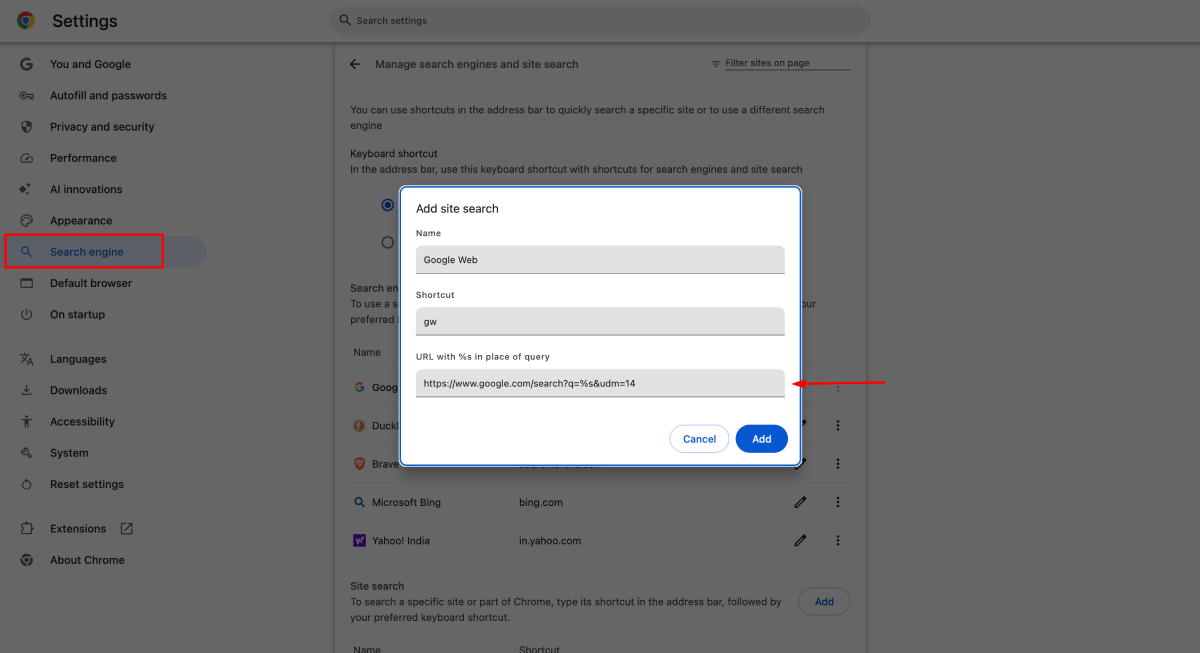
I am using the udm=14 query filter that shows plain links with no AI Overview. You can just make it your default search in both browsers. Add a search engine that uses it, and every Google search from the address bar lands there.
https://www.google.com/search?q=%s&udm=14For Chrome – Go to Settings > Search engine > Manage search engines > site search (or paste chrome://settings/searchEngines into the address bar). Next to Site search, click Add. Give it a name like Google Web, a shortcut like gw, and paste the URL above into “URL with %s in place of query”. Then click the three dots next to your new entry and choose Make default.
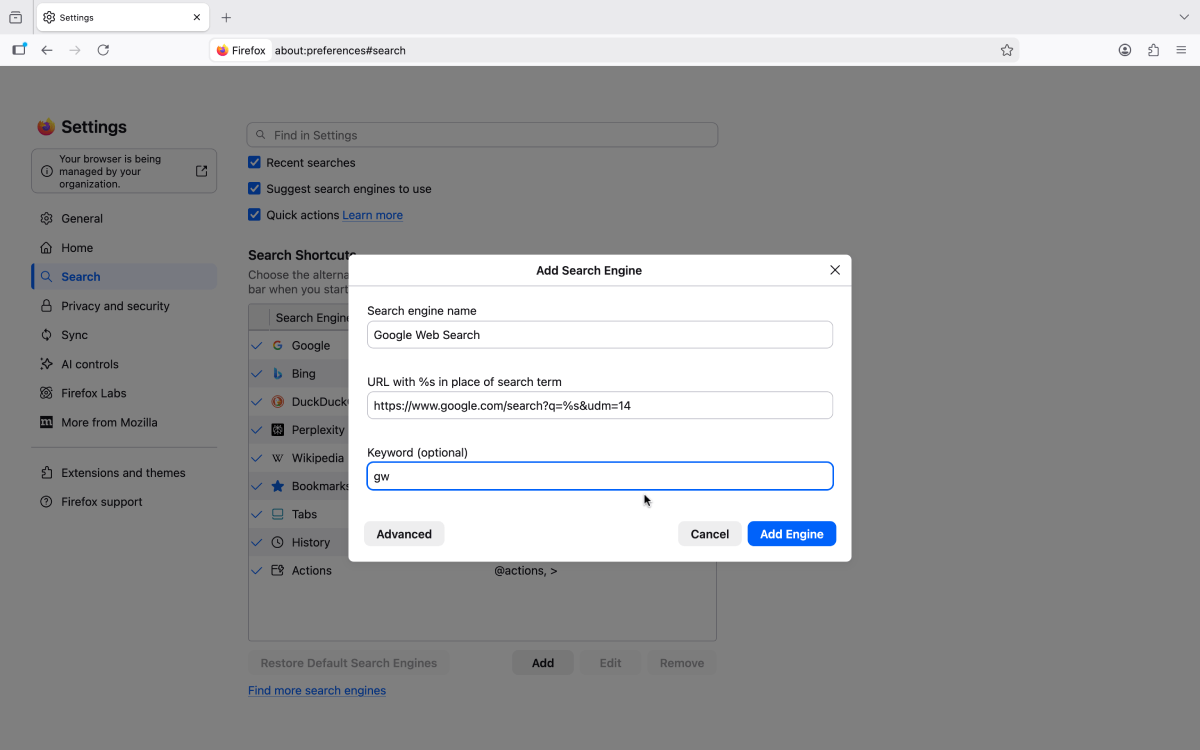
Firefox – Go to Settings > Search > Add below the list of search engines (newer versions call it Add search engine). Fill in the name, paste the URL into “URL with %s in place of search term”, add a keyword if you like, and click Add Engine. Then pick your new engine from the Default search engine menu on the same page.
Gotcha – It only works for searches you start from the address bar, so typing into google.com itself still gets you the AI box. And Google has never promised to keep udm=14 around.
It depends on what you want to do with Ubuntu. For casual programming and learning any of these will work on a decent configuration. For machine learning and the likes you are better with a dual boot, or a cheap virtual host provider.
For general learning, I’d personally go with Hyper-V as it’s a type-1 hypervisor and would have much lower latencies compared to VMWare or VirtualBox. It comes along with Windows 10 and creating a VM is easy. You will need some extra configurations to get started with features like fullscreen guest OS, but Hyper-V is more mature now and there is plenty of documentation available.
Once you change the firefox shortcut icon, unpinning and pinning it back to start menu will automatically update the tiles. This is better than replacing the png files inside the program folder as an update will revert it to the latest iteration. Good post nevertheless! Thanks!
Without password protection, you can’t stop anyone from copying a PDF. You can still convert the text elements as images and embed them back into PDF, but that cant stop others printing it and copying it.
It is possible. If you search the play store, you can find many companion apps for foobar.
Glad to help!
Amazon has a Send to Kindle application that you can use for larger files. Once installed, you will be able to find the option in the right click context menu.
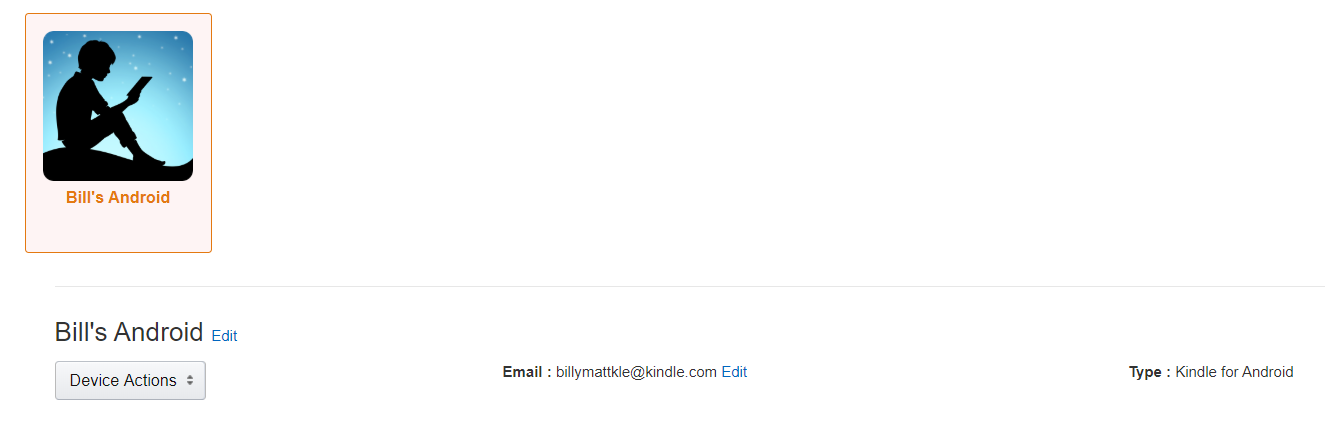
If you are logged in with your Amazon account, you will find your device’s email under the Devices tab.
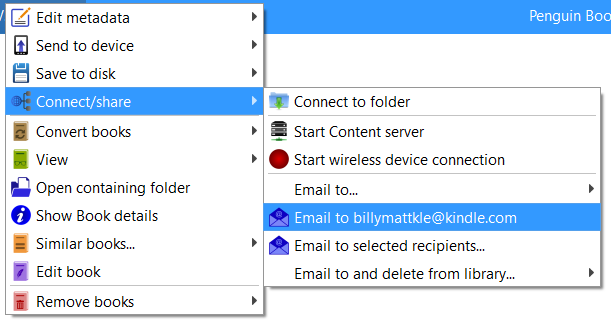
You can email the books from your Calibre library to your Kindle email id. Settings can be found under connect and share.
Bulk syncing may take up time, but that is the only way to go.
You are welcome. All credits to this guy.
Before you try a fresh install, try this: Change your folder options to show hidden files. Check whether if you have a folder named SQM here C:\Users\Default\AppData\Local\Microsoft\Windows\Temporary Internet Files and delete it.
After creating a new account, try copying all the contents from the default folder to your new user folder and restart.
Login back with your old account and follow these steps:
- Type
regeditin the search and open Regedit - Find this key
HKEY_LOCAL_MACHINE\SOFTWARE\Microsoft\Windows NT\CurrentVersion\ProfileList - There should be some folders starting with
S-1-5. Click on each folder and find if any of it has theProfileImagePathwith your new user account name. - If there are two folders, rename the one with
.bakextension to be the main one - Find keys
RefCountandStateand set the value to0by double clicking on them. - Restart and check now.
This is more likely due to a corrupted user profile. Did you restart and try logging in again?
You’re welcome.
Try WinCDEmu. It mounts a bin file perfectly. You might need to manually associate bin files to open with WinCDEmu after the install.
Windows don’t support .bin files natively. What type of file is it? Does it come with a .cue file? If there is a cue file in the folder try clicking on the .exe file. This will do the job!
Oh it does! The network svchost services hogs down resources once it begins reading the hosts. But for single device on a network, it is simple than running a VM. If it is for a network wide blocking a dedicated blackhole makes sense.
Running Pi Hole with VM or Docker will require 500 M memory at minimum. I prefer using a DNS proxy like Acrylic or even the default Windows hosts.
Addons like Acrobat are installed from folders that don’t belong to Firefox. Most of these addons are tied to a specific software that sideloads these addons as soon as a new browser session is spawned. As they are out of Firefox’s control, it won’t display the remove button.
Adobe loads the said extension in all the browsers. There is an easy guide from Mozilla KB here on how to uninstall and remove persistent extensions manually.
Follow these steps:
- Menu > Help > Troubleshooting Information.
- Scroll to ‘Application Basics’ section and click on ‘Open Folder’.
- And in the folder, navigate to the extensions directory and delete the Adobe Acrobat extension (you should be able to identify it, but if you can’t, go back to the ‘Troubleshooting Information’ page and find the id in the ‘Extensions’ section).
As the name says, it is all about your Firefox account sync. The term Chrome is not related to Google Chrome at all. It means the visible portion of the browser except the website part (toolbars and other UI components). And the details stored in there in the password field has two key strings that encrypts and decrypts your sync data with Mozilla’s servers. So it’s safe and you don’t have to delete it.
Ayyyee the dreaded VoLTE notification! Been there! Unfortunately, the only way to disable this is by turning off the VoLTE (which is stupid!). But if that notification is really bugging you, you can root (warning! this voids warranty) your device and use this Xposed module to remove it. For Lollipop, here is the Xposed installer.
Sorry for the delay! I can only confirm the said behavior on Nougat. But setting Waze as your default app should work regardless the version. I don’t know what is wrong with Oreo. You can still try forcing any of the other apps you mentioned with a default app manager app. OR try using the send to navigation app.
Viewing 25 replies - 1 through 25 (of 52 total)